

Narrow the nearby list
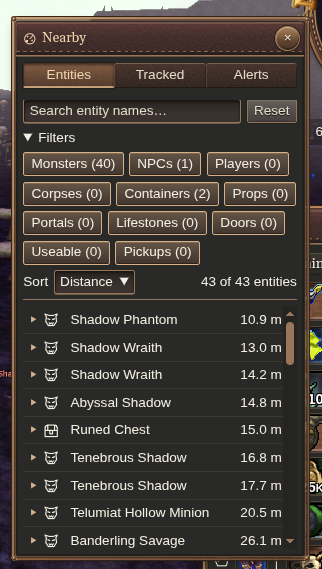
Click Nearby entities and alerts on the minimap’s lower-left rim, or press Ctrl+F, to open the entity list.

Search names and use the category, tracked-name and sorting controls to reduce the list to what you need.
Select a result to make it your current target, then inspect it or interact using your usual target controls. For everyday combat selection, Smart Tab is usually the quicker starting point.
Select by name from chat
Use /scan NAME to select a nearby creature or object without opening the list. For example, try /scan diamond golem. Abbreviations such as /scan dmnd glm work too.
The best name match wins; equally good matches select the nearest. If nothing matches, chat shows No entity found and keeps your current selection.
See the chat commands reference for command syntax.
Add a name alert
Use the name-alert control on a nearby entry for an exact match, or create a rule in the alert editor. Choose how the name should match:
| Match | Example | Matches |
|---|---|---|
| Exact name | Drudge Prowler | That full name |
| Substring | Drudge | Names containing that text |
| Name glob | Drudge * | A full name beginning with Drudge |
Matches ignore capitalization. In a glob, * matches any text and ? matches one character. Use a backslash to match a literal *, ?, or backslash.
Check the editor’s preview against nearby names, then save the rule.
Click the linked name in a chat alert to select the creature or object. Hold Control (Command on macOS) while clicking, or enable chat-history interaction.
Manage your alerts
Enable or disable individual rules as needed, and delete rules you no longer use. Rules are saved for the character.
Alerts notify you about matching nearby encounters without repeating the same notice continuously. Choose patterns specific enough that the notifications stay useful.