

Unlock a door or container
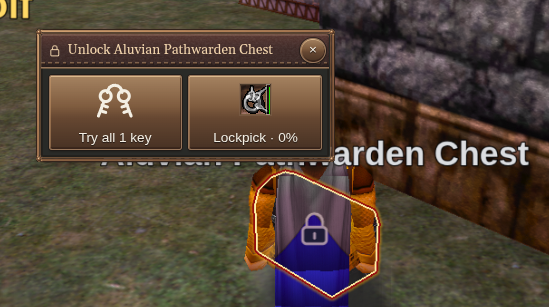
Try to use a locked door or container. With the unlock helper enabled, Holtburger offers the available key and lockpick actions.
The helper is enabled by default. Automatic key use is a separate setting and starts disabled.
Try your keys
Choose Try all keys to try the distinct keys available in your inventory. The helper shows how many are available and reports the result.
If you prefer this to happen when you encounter a lock, enable Automatically try inventory keys under Settings → Gameplay → Locks. If the keys do not open it, the helper can offer the lockpick fallback.
Pick the lock
The helper presents the best usable pick for your trained lockpicking skill. Check the pick and the success estimate when one is available, then activate the pick action.