

Pick something specific
Click a particular object when you know what you want, or find it in the Nearby list. Use R to interact and E to examine; right-clicking also selects and examines.
You can also select by name with /scan NAME, such as /scan diamond golem.
For looting, the controls reference includes dedicated object and corpse cyclers.
Use the selected-entity HUD
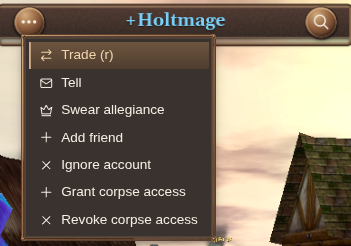
The selected-entity HUD keeps the name, health bar and relevant actions together. The magnifying glass opens inspection.
Open Selected entity actions beside the name for actions suited to your selection. A player can offer Tell, Trade or Invite to party; an item can offer Split stack or Salvage.
Use or pick up
Select something and press R to interact. For a loose item, that means picking it up; for an item you carry, it can mean using or equipping it. Containers and other world objects open their relevant interaction.
Some items need a target. Activate the item first, then choose what to use it on. Follow the targeting prompt; Escape cancels.
Loot and world containers
Select a container or corpse and press R to open it. Use its contents to move items into your inventory. V cycles corpses; Shift+V cycles in reverse. Unopened corpses take priority. When none remain in range, the same shortcuts cycle opened corpses so you can revisit them.
Equipment in an open container is appraised automatically so its cantrip-tier borders can appear while you browse.
For locked doors and containers, use the key and lockpick helper. To clear unwanted gear, sell it or salvage it.
Give an item
- Select the person or NPC receiving the item.
- Select the item you want to give.
- Press G and review any confirmation.
Holtburger remembers the selected recipient while you browse items, so you can choose another item without selecting the recipient again. Check the recipient shown before confirming.
For an exchange of offers, use player trading.
To hand over part of a stack, split it first.