

Your HUD at a glance
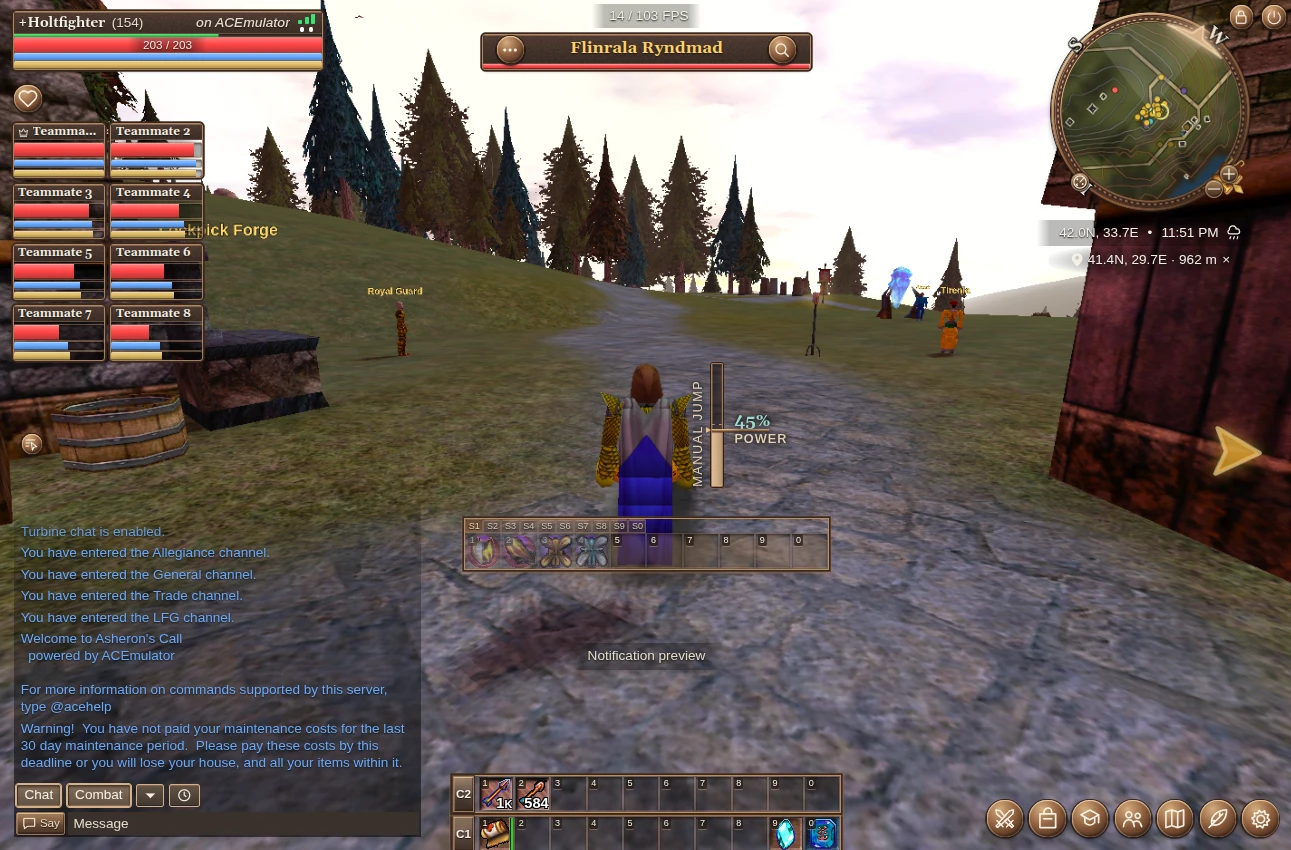
| Component | Where | What it does |
|---|---|---|
| Character HUD | Top left | Your health, stamina and mana, plus connection status. |
| Party HUD | Left, below your vitals | Teammates’ vitals at a glance; select a member directly. |
| Selected entity | Top center | The selected name, health, inspection and relevant actions. |
| Offscreen selection arrow | Right edge in this view | Points toward your selected entity when it is outside the viewport. |
| Buffs & debuffs tray | Left, above the party HUD | Opens your beneficial or harmful enchantments; icons appear as effects become active. |
| Minimap & waypoints | Top right | Terrain and nearby entities, coordinates, and direction and distance to your destination. |
| Jump power | Center | Your charged jump power, or the power chosen for a precise jump. |
| Spell bar | Below center | Tabbed spell shortcuts; melee and missile stances show attack controls instead. |
| Chat | Bottom left | Messages, commands and clickable links, with click-through history when inactive. |
| Action bars | Bottom center | Shortcuts for items and equipment loadouts. |
| Notifications | Above the action bars | Brief feedback on actions and errors. |
| FPS counter | Top, beside the selected entity | Frame rate; toggle it with /fps. |
| Toolbar | Bottom right | Open your panels and settings. |
Arrange these components in Layout & theming, or see what changes from retail.